
Enter the coupon once.
It ends up on the invoice.
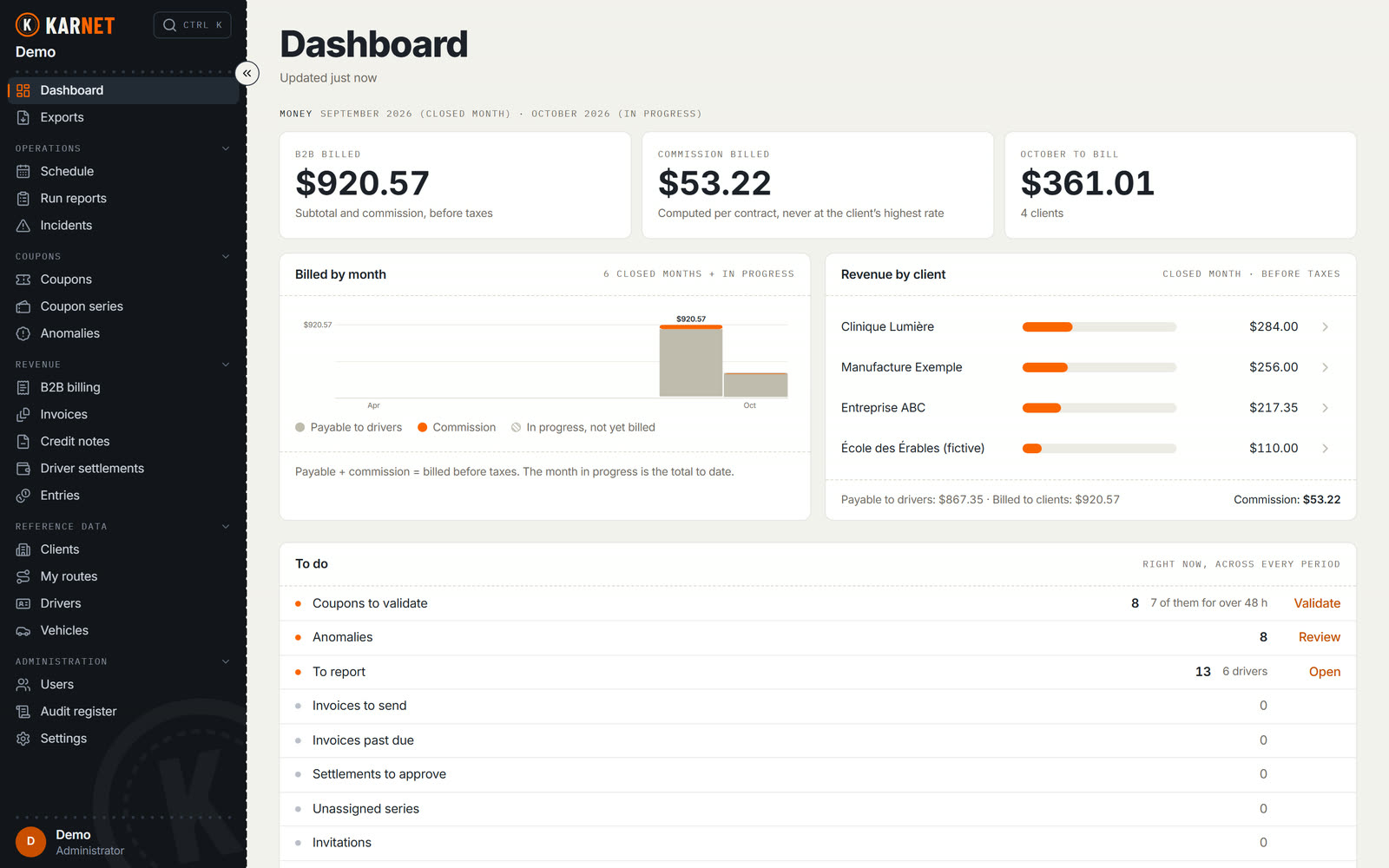
The driver captures the coupon on their phone, even with no signal. The office validates it, invoices it and builds driver pay from it.
What the paper book costs you, every month.
None of this is your office’s fault. It is what happens when the only copy of a trip is a sheet folded in a pocket.
Closing the month, as it actually goes
Today- 01
The coupons arrive in a stack, at the end
Someone retypes them into a spreadsheet, one by one, while the next month has already started.
- 02
A number is missing from the book
Nobody can say whether it was lost, voided, or never filled in. The question gets settled from memory.
- 03
The driver’s total doesn’t match the office’s
The gap is hunted by hand, coupon by coupon, and is rarely found in full.
- 04
The client disputes the invoice
The line carries an amount and a date, but not the route. An invoice a client cannot reconcile gets disputed as a whole.
All four come from the same place: the trip was written down only once, on paper, and never at the moment it happened.
Twenty-two seconds, from the phone to the invoice.
The same coupon, captured on the road, validated at the office, then invoiced to the client and carried into the driver’s pay.
The film’s text
- The driver enters the coupon in the app.
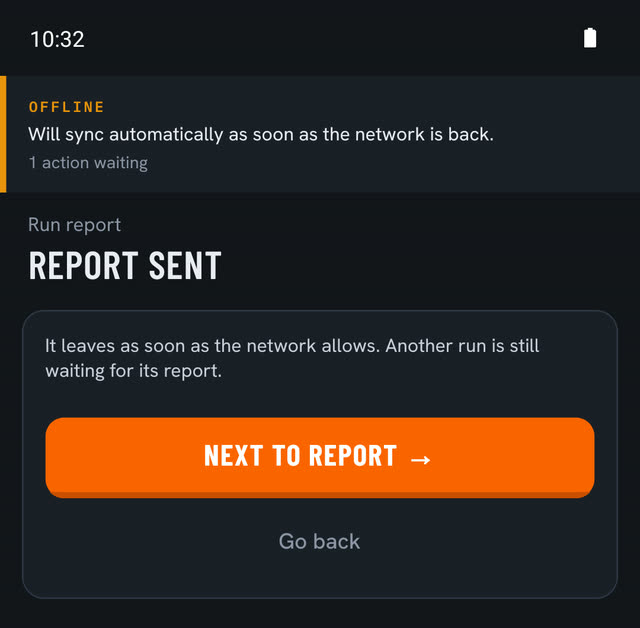
- No signal? The coupon is kept and sent when the connection is back.
- Coupons reach the office automatically.
- The office validates. Discrepancies are flagged before billing.
- Invoices and pay statements come from the same coupons.
- One entry. Never retyped.
The driver writes it once, where they are.
The driver app has four tabs and works with no network. In a basement or on a country road, the entry goes out anyway: the queue sends it when the signal returns, never creating a duplicate.
For iPhone and Android. For now the app installs as a test build, outside the stores.
The sync queue
Every entry carries a submission key. If the network drops between the send and the reply, the app retries, and the server recognizes the entry it already received instead of writing it twice.
That is what makes it possible to capture without checking for bars.
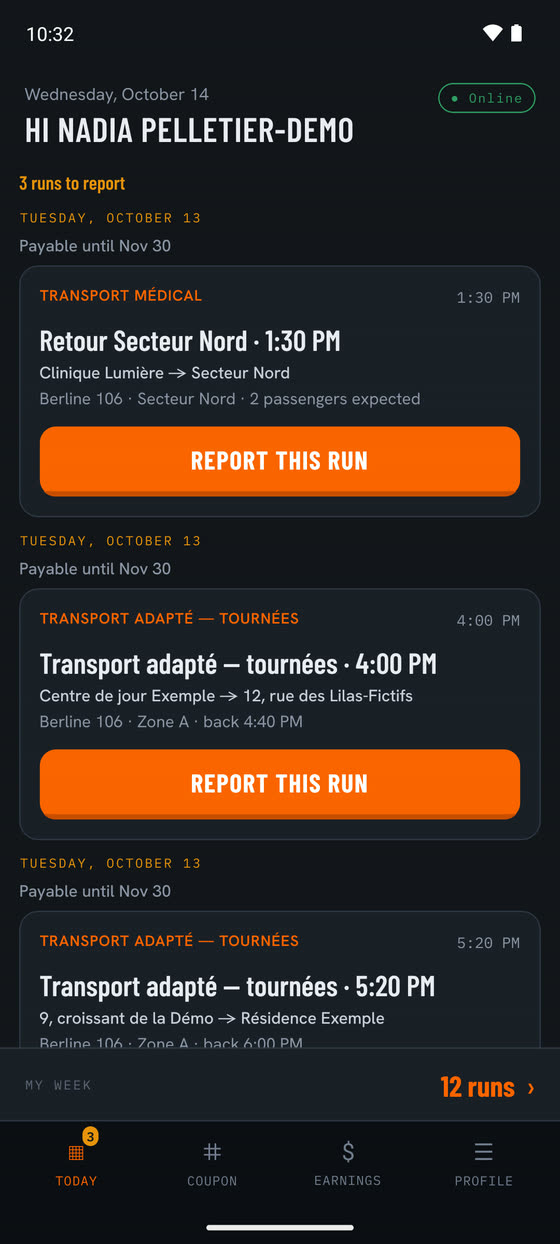
Today
The runs published for the day: vehicle, route, return time, expected headcount. The driver confirms the run, then reports it. The office publishes the schedule the day before.
Coupon
The number is typed, or scanned when the coupon carries a QR code, and the client appears on its own from the book. A photo of the coupon can go with it, then a last confirmation screen.
Earnings
The week’s total, how many runs are proven, what the office has not yet checked against the paper, and the pay statements.
Profile
Language, light or dark theme, documents to renew, incidents and password.
And that same entry travels the rest on its own.
Nothing is retyped along the way. Each step takes what the previous one laid down.
- Driver
Capture
The coupon is captured in the app, with or without a network.
- Karnet
Cross-checks
The run report is checked against the published run: headcount, seats, zone. Gaps become anomalies.
- Office
Validation
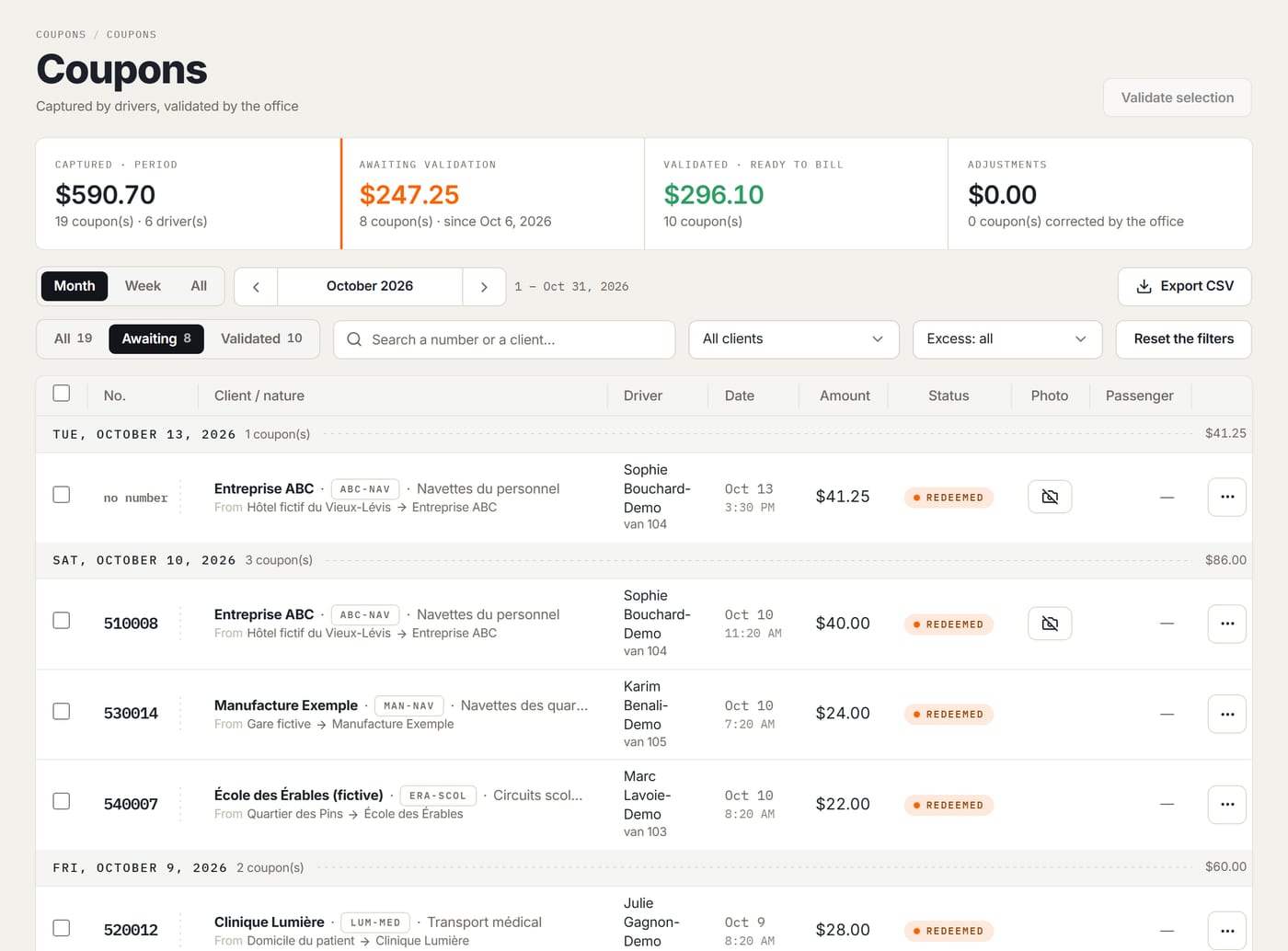
The office validates in bulk, or adjusts the price with a reason the driver sees.
One entry, two documents
- Client
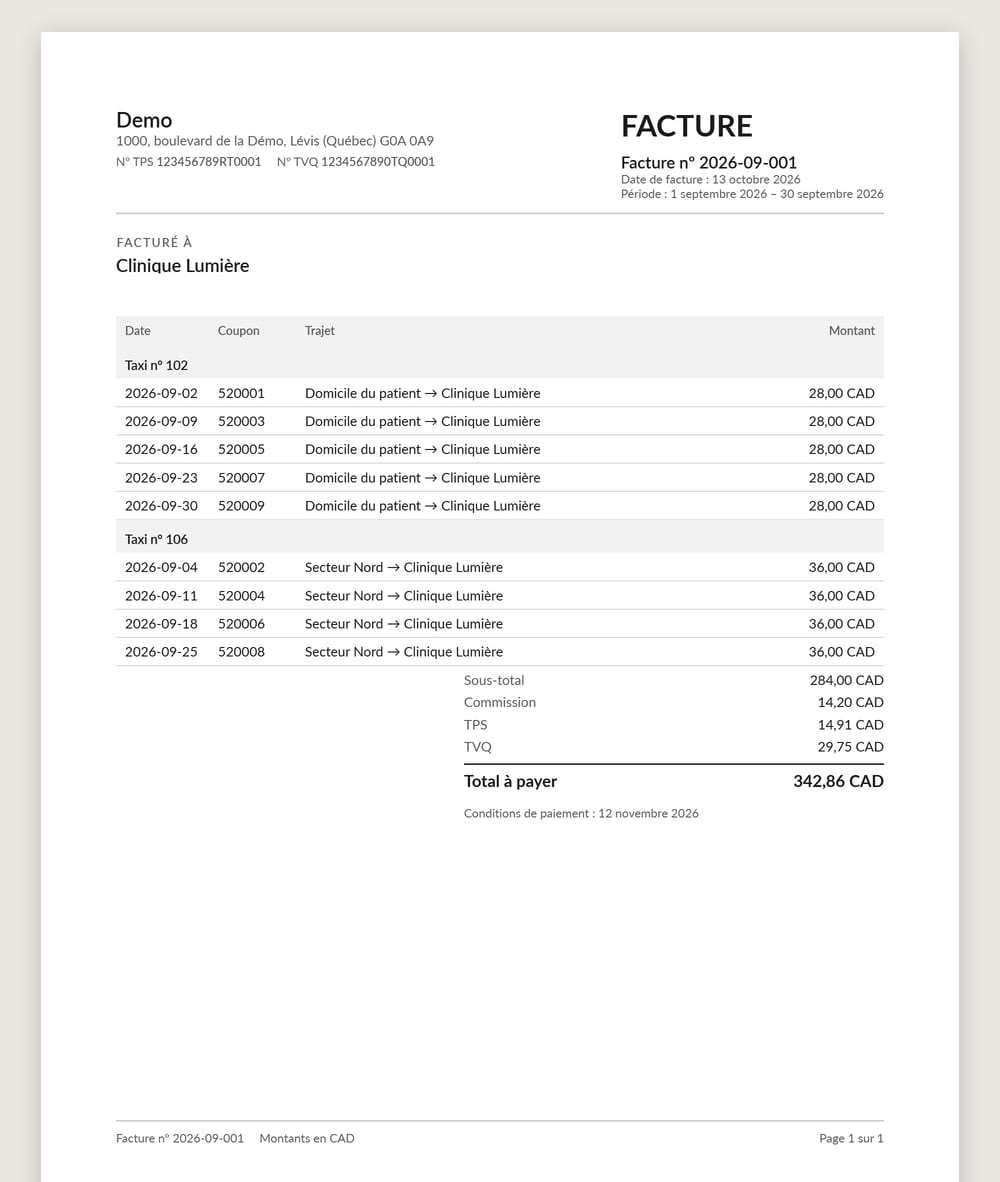
Invoice
A closed month invoices in one gesture: one invoice per client, commission per contract, GST and QST on the server. The PDF goes out by e-mail.
- Driver
Pay statement
The statement for the period, from those same coupons, as a PDF. A coupon is paid only once.
- Client
What the cross-checks catch
Before the invoice- More passengers than seats in the vehicleCritical
- Coupon number differs from the planned oneCritical
- Run without a billing zone, or zone with no rate in forceCritical
- Passenger count differs from the planTo check
- Published run with no reportTo check
- Coupon captured and still not validatedTo check
- Possible duplicateTo check
- Refused at capture: a number already captured, or outside the client’s series.
An anomaly never blocks the driver’s entry. A critical one blocks that coupon’s validation, and so its invoicing; the rest of the month invoices normally.
The week’s schedule, published to drivers.
Recurring lines are set once, the week can be copied, and publishing sends it to the driver app.
- Office
Schedule
The week is put together: recurring lines, usual routes, tours.
- Office
Publish
One gesture sends the week to drivers; an unpublished change stays at the office.
- Driver
Today
The day’s runs in the app, with a reminder before departure.
- Driver
Run report
The run is reported, then checked against what was planned.
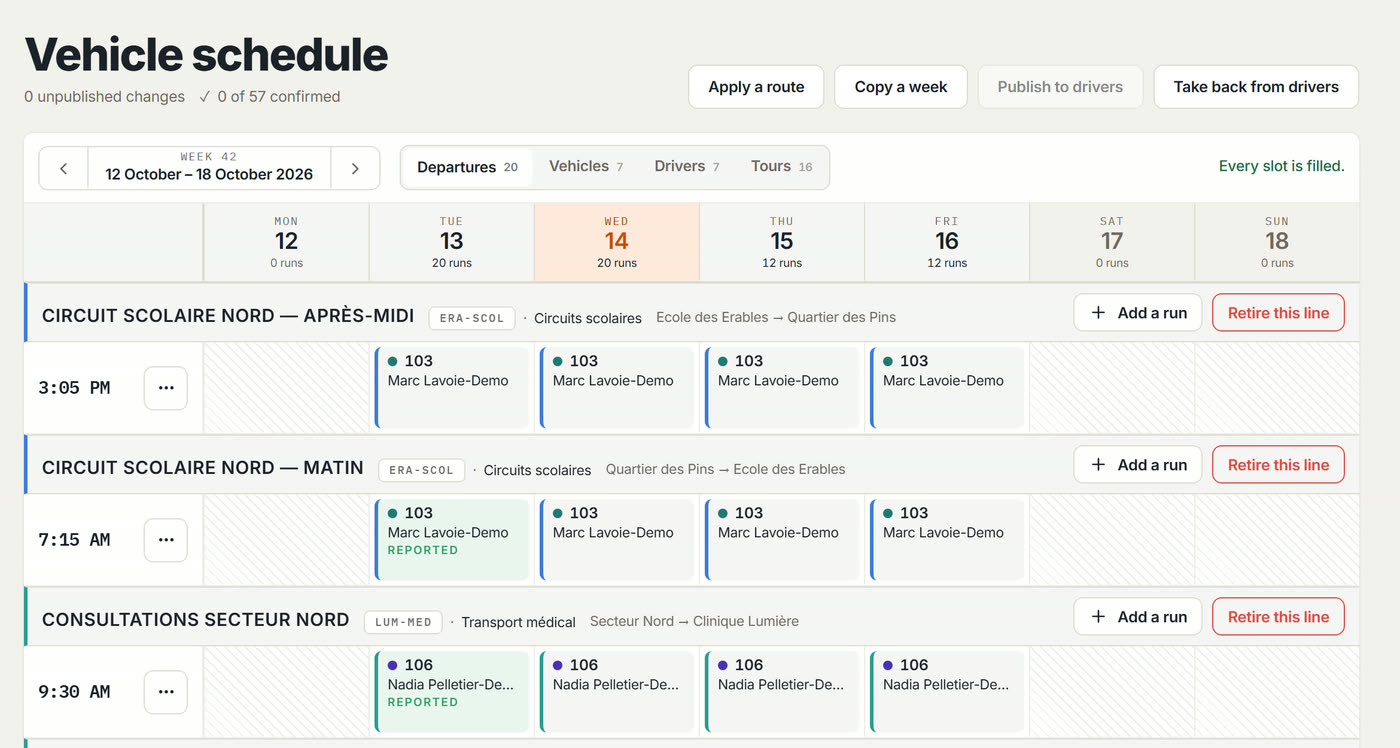
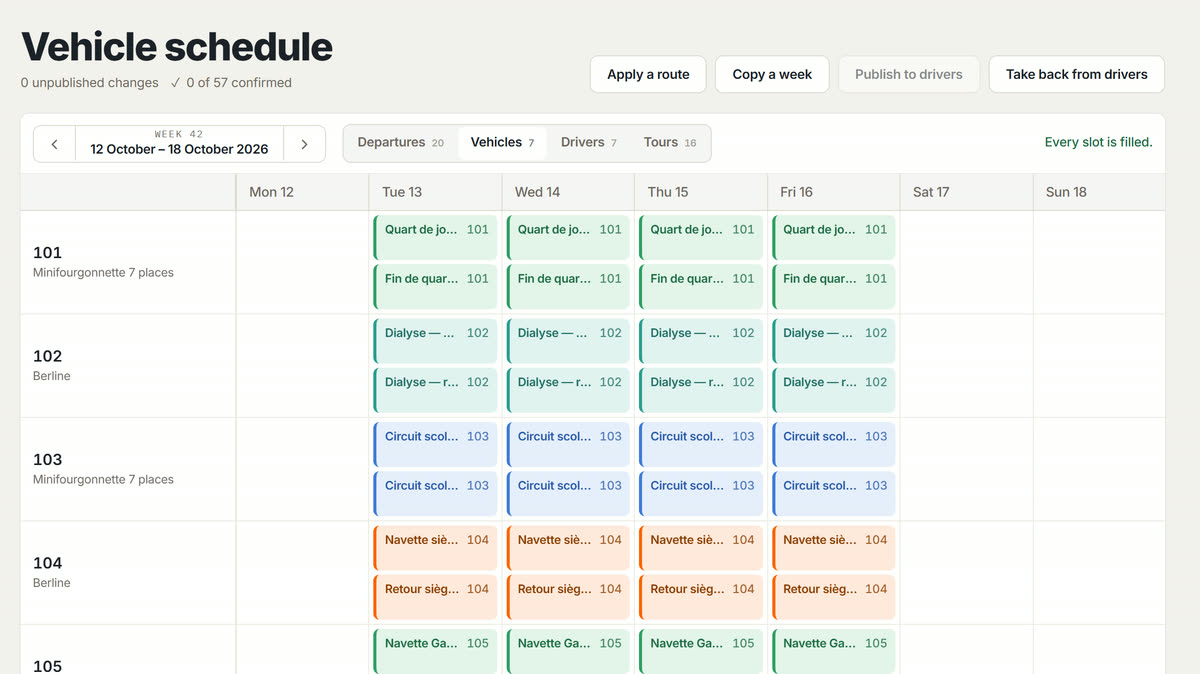
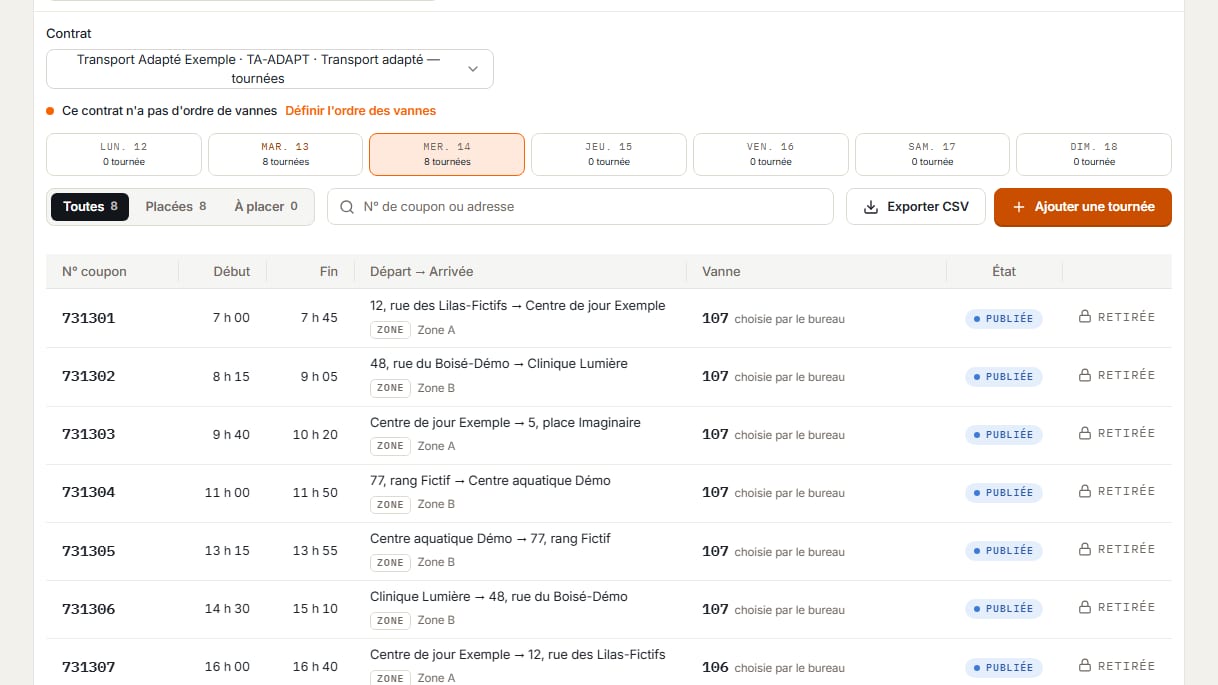
- Three views of the same week
- By departure, by vehicle and by driver, each run in its contract’s colour.
- My routes
- Usual trips apply to the schedule in one gesture instead of being copied out.
- Tours
- For clients who print their own coupons, tours are placed by van rotation order.
The whole office, grouped the way you work.
This is the product’s real navigation. Every register has its counted tabs, its server-side search and its CSV export of the whole filtered set, not just the page on screen.
Operations
- ScheduleThe week by vehicle, published to drivers
- Run reportsWhat actually ran, against what was planned
- IncidentsAn exchange with the driver, with photos and reminders
Coupons
- CouponsDriver capture, office validation, price adjusted with a reason
- Coupon seriesRanges received from the printer, assigned to a client
- AnomaliesThe cross-checks, open and resolved
Revenue
- B2B billingWhat the month would invoice, per client, before running it
- InvoicesIssued invoices, as PDF, sent by e-mail
- Credit notesThe correction of an invoice already issued
- Driver settlementsEach driver’s statement, over the same period
- EntriesThe commissions and dues the company keeps
Reference data
- ClientsCorporate accounts and their contracts
- My routesUsual trips, reused in the schedule
- DriversWho drives, their usual taxis, their documents to renew
- VehiclesThe taxis, their category and their capacity
Administration
- UsersWho gets in, with which role, by invitation
- Audit registerWho did what, when, on which record
- SettingsSecond factor, billing identity, colours, language
And on every screen
- Global search
- Ctrl K finds a name, a coupon number or a plate across every register.
- Live updates
- A coupon captured on the road shows up at the office without reloading the page.
- The company’s e-mails
- In your colours, in the recipient’s language, and replies come back to your address.
- Paper and virtual books
- A client without a printed book gets virtual numbers the driver draws in the app.
- Client cap
- The client pays up to a maximum, and the passenger pays the rest.
- Documents to renew
- Permit, taxi insurance: the office and the driver see what is about to expire.
Roles are not a fixed list: an administrator creates their own, named as they like, by ticking capabilities. Only two are locked, administrator and driver, so a company cannot lock itself out.
Coming, on request
These two modules are built, but switched off for every company. We turn them on case by case.
- Ride dispatch
- The office offers a ride to drivers, who accept it and follow it in the app.
- Live taxi map
- Where the taxis are, at the office, only during the shift the driver declared.
The guarantees, and where they live.
Each one is a rule written in the code, not a guideline to follow.
Amounts are computed on the server
Always. Taxes go through a single service, with dated rates. The screen displays what the server returns; it never recomputes it.
Strict isolation between companies
A filter on every query, and PostgreSQL row-level security underneath. Two locks, not one.
An audit register that cannot be erased
Who did what, when, on which record. Lines are appended and chained; the database refuses to change or delete them.
Exports are recorded
Every export is recorded with its row count before the file leaves. Past 5,000 rows, it is prepared in the background.
Two-step verification
A code from an authenticator app on top of the password, required of whoever you choose, and asked again on sensitive office actions if you want it.
Application and database in Toronto
Logs and e-mail stay in Canada. Logs carry identifiers, never names or phone numbers.
French and English, end to end
Both applications, in both languages, at parity. Time zone and currency follow the company.
Your colours, not ours
The company’s brand colour applies as soon as the app opens, at the office and in the driver app.
We are not asking you to jump. We are asking you to compare.
The first phase runs on double entry. The driver fills in the paper coupon as usual, and also captures it in the app. At the end of the week, the two totals must be identical.
- 01
One contract, two willing drivers
We do not switch the company over. We take one corporate client and two drivers who agree to try.
- 02
One week, paper and app side by side
The book keeps existing. Nothing depends on the software yet, and nothing is lost if it disappoints.
- 03
We compare the two totals
If they match, you have proof rather than a promise. If they don’t, we know exactly where to look.
Getting started
Example · CADUntil the two totals are identical, the paper stays the reference. You decide when it stops being one.
Monthly subscription, based on your taxis under contract.
Hosted, updated, backed up every night: no server to keep running at your place. The price follows the number of taxis under contract, in brackets.
The brackets are set with you
Karnet is starting with its first companies, and publishing a grid before knowing their volumes would mean inventing a number. Write to us with how many taxis and contracts you have: the answer will be a price, not a brochure.
Thirty minutes, your numbers, not ours.
We show you the product with a month that looks like yours: your driver count, one of your contracts. You will see the capture on the phone, the validation at the office, and the invoice that comes out.
Or write directly to info@karnets.ca
Book a demonstration
fr-CA · en-CASent. We reply within one business day.
Something is missing: check the name, company and email.
The send did not go through. Write to us directly at info@karnets.ca: the message was not lost on the way, it simply never left.
This information is used only to call you back. It is neither sold nor shared. Privacy policy